
@1.svg)
Understanding HubSpot seat types is essential for maximising your CRM investment and ensuring your team has the right access to drive growth.
What are HubSpot seat types and why do they matter
HubSpot's seat-based pricing model determines how users within your organisation access and interact with the platform. Each seat represents a licensed user with specific permissions and capabilities tied to one or more HubSpot Hubs—Sales, Marketing, Service, or CMS. Understanding this structure is crucial for maximising your CRM investment whilst controlling costs.
Seat types matter because they directly impact both your budget and team productivity. Assigning the wrong seat type can lead to either overspending on unnecessary access or restricting team members from tools they need to perform effectively. With HubSpot's flexible seat allocation, you can tailor access levels to match each user's role, ensuring everyone has precisely what they need without paying for redundant features.
For marketing directors and heads of marketing, getting seat allocation right means optimising spend whilst maintaining the functionality required to drive lead generation, automate campaigns, and track performance. It's about striking the balance between empowering your team and managing your marketing technology budget strategically.
Core seat types explained: Sales, Marketing, Service, and CMS
HubSpot's core paid seats are organised around four primary Hubs, each designed for specific business functions. Sales Hub seats provide access to sales tools including pipeline management, email tracking, meeting scheduling, and deal automation. These seats are ideal for sales representatives, account managers, and business development professionals who need to manage customer relationships and close deals efficiently.
Marketing Hub seats grant access to campaign creation tools, email marketing, landing pages, forms, social media management, and marketing automation workflows. These seats are essential for marketing managers, content creators, and demand generation specialists who need to build inbound campaigns, nurture leads, and track marketing ROI. With Marketing Hub access, your team can automate repetitive tasks, segment audiences, and deliver personalised campaigns based on real-time customer behaviour.
Service Hub seats are designed for customer support teams, providing ticketing systems, knowledge bases, customer feedback tools, and service automation. These seats enable support agents and customer success managers to deliver exceptional post-sale experiences, manage customer satisfaction, and reduce churn through proactive engagement.
CMS Hub seats provide access to HubSpot's content management system, allowing users to build, manage, and optimise website content. These seats are suited for web developers, content managers, and digital marketers who need to create high-performing websites that support lead generation goals. Each Hub can be purchased separately, and users can hold seats across multiple Hubs depending on their role requirements.
View-only seats and free user access
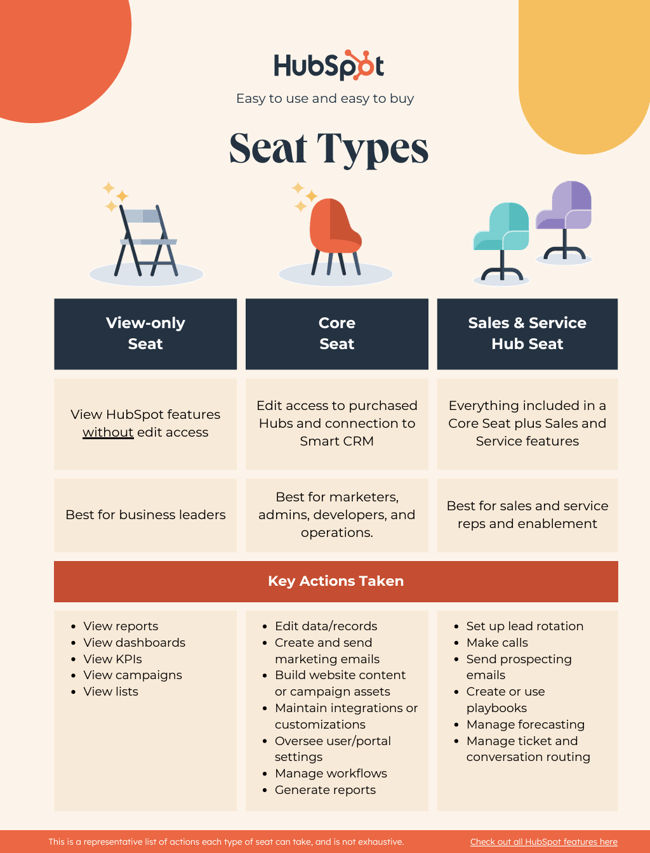
Not every team member requires full editing capabilities within HubSpot. View-only seats offer a cost-effective solution for stakeholders who need visibility into CRM data, reports, and campaign performance without the ability to make changes. These seats are perfect for executives, finance teams, or department heads who want to monitor marketing and sales metrics but don't need hands-on access to tools.
HubSpot also offers free user access through its CRM, which provides basic contact management, deal tracking, and reporting capabilities at no cost. Free users can access foundational CRM features, making it an excellent option for small teams just starting with HubSpot or for organisations wanting to extend limited access to peripheral team members without incurring additional costs.
Understanding the distinction between view-only seats, free users, and paid seats is essential for budget management. View-only access typically comes at a reduced cost compared to full paid seats, whilst free CRM access costs nothing but comes with feature limitations. By strategically assigning these lower-tier access levels to appropriate team members, you can maintain transparency and collaboration across your organisation without unnecessarily inflating your HubSpot subscription costs.
Choosing the right seat allocation for your team
Determining the optimal seat allocation starts with mapping your team's roles and responsibilities against HubSpot's capabilities. Begin by identifying who needs to create and edit content, manage campaigns, or close deals—these users require full paid seats. Next, consider who needs access purely for reporting or oversight purposes—view-only seats may suffice for these stakeholders.
Marketing directors should evaluate their team structure carefully. For instance, a marketing manager running campaigns needs a Marketing Hub seat, whilst a graphic designer who occasionally uploads assets might function effectively with view-only access or even free CRM access if they're simply tracking project status. Similarly, sales development representatives actively working leads need Sales Hub seats, but an operations analyst reviewing pipeline reports might only require view-only access.
Consider future growth when planning seat allocation. HubSpot allows you to adjust seats as your team scales, but anticipating needs helps avoid disruption. If you're implementing HubSpot for the first time, start with core users who will drive immediate value, then expand access as adoption grows and additional team members require platform access.
It's also worth noting that users can hold multiple seat types simultaneously. A revenue operations manager might need both Sales and Marketing Hub seats to align teams and manage the full customer journey. Assess these cross-functional roles carefully to ensure they have the tools needed to break down data silos and maintain a unified view of customer interactions across channels.
Optimising seat costs whilst maintaining functionality
Optimising HubSpot seat costs without compromising functionality requires regular audits of user access and activity. Review who's actively using their assigned seats and whether their access level matches their current responsibilities. Team members who have moved roles or reduced their platform usage may no longer require full paid seats, presenting opportunities to downgrade access and reduce costs.
Consolidate seats where possible by identifying overlapping responsibilities. If multiple team members share similar tasks on a rotational basis, consider whether they could share access or whether some could manage with view-only seats supplemented by occasional full access when needed. However, balance cost savings against productivity—restricting access too heavily can create bottlenecks that harm overall performance.
Leverage HubSpot's free tools strategically. The free CRM offers robust functionality for basic contact management, making it suitable for teams or departments that need visibility into customer data without requiring advanced automation or reporting features. This approach works particularly well for extending CRM access to sales support staff, junior team members, or cross-functional collaborators who need occasional platform access.
Work with a certified HubSpot partner to ensure your seat allocation aligns with your business objectives and growth plans. Expert guidance helps avoid common pitfalls like underutilising paid seats or restricting access in ways that limit your team's ability to drive quality leads and revenue growth. Strategic seat management, combined with proper onboarding and ongoing support, ensures your HubSpot investment delivers maximum ROI whilst keeping costs under control.
Remember that optimising seat costs isn't solely about reducing spend—it's about ensuring every pound invested in HubSpot directly contributes to your ability to track performance, make data-driven decisions, and scale operations efficiently. The right seat allocation empowers your team to automate lead nurturing, deliver personalised campaigns, and maintain the single source of truth needed to manage customer relationships effectively.