@1.svg)
Collecting Multiple Email Addresses on a Single HubSpot Form
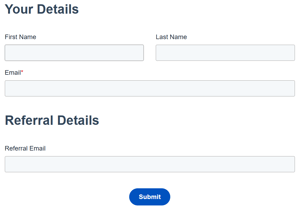
Sometimes you need to capture more than one email address on the same form submission and create more than one Contact record. A referral programme is a common use case, where the person filling in the form is submitting details for someone else.
The problem is that HubSpot's forms won't let you do this simply. Here's why, and a workflow workaround that will give you the same result.
Why you can't just add a second email address property
Your first instinct might be to create a second contact property, something like "Referral Email," formatted as an Email address, the same format as the standard email field.
Try adding it to the form though, and you won't even see your new property in the form editor. HubSpot doesn't allow a second Email-type property to be shown in forms. The native email property is tied to how HubSpot creates, identifies, and deduplicates contacts, so a second one on the same form isn't supported.
Single-line text property with a custom regex rule
At Floww Digital, the way we get around this for clients is to create the second property as single-line text rather than Email. On its own though, that will accept anything a user types in, so the crucial step is to add custom validation rules.
Under the property's field rules, switch from basic validation to custom rules, then add a regex rule that checks the input value for a valid email format. HubSpot's Breeze AI can write a solid regex rule for this directly in the property settings. It handles most standard use cases, but occasionally you'll want to tweak it for something more specific to your data needs.
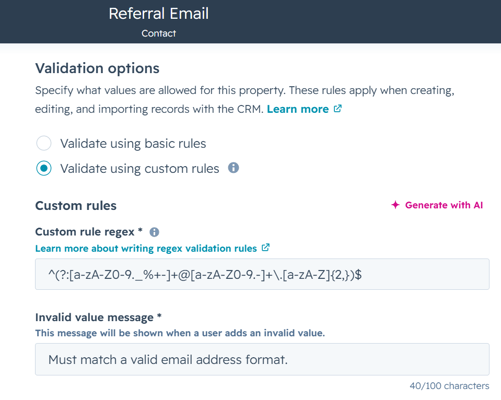
Finally, test before saving. An extra space at the start or end of an entry, for example, should be rejected. Try a few invalid entries. If it's not being flagged by the rule, adjust it further before you finalise.
Once the field/property is configured, refresh the form, add the new property, and publish.
Workflow creates the new contact record
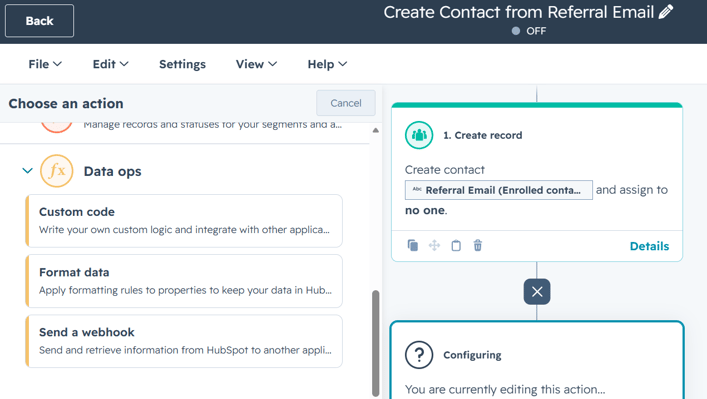
Create a new workflow so that upon form submission HubSpot creates a new contact record using the referral email (and any additional details like First Name/Last Name that you're collecting). A couple of things worth setting up alongside this:
-
Re-enrollment: turn this on if you expect the same contact to submit the form multiple times to refer different people.
- Association: the newly created referral contact will automatically associate back to the contact who submitted the form in the first place. Consider whether you want add additional associations or labels.
The out of the box "create a record" workflow action works well and is the quick to set up, but if you have access to custom coded workflow actions, it's a more robust approach.
Custom-coded Node.js action can check if the contact already exists before creating
If you're on a HubSpot plan with access to custom code workflow actions, write a Node.js script authenticated via a HubSpot Service Key or Private App token that has read/write scope on Contact objects in the CRM.
The advantage is the freedom to add more logic. Instead of always attempting to create a new contact (an action that will fail if the referral email already exists in your portal), the script can first search for an existing contact with that same referral email address. If it exists simply update that contact with any newly captured information. If no match is found then the script creates the new contact and associations.
Pro tip: Write the script to also capture errors and add a "send internal email" action at the end of the workflow to feed that error message back to your team so you can monitor performance in real-time rather than occasionally checking the workflow logs.
We've set this up for a number of clients now, and it holds up well in practice. If this sounds like something you need support with, get in touch.